Setting Up R, RStudio, & microCTr
setup-r.RmdThis is a brief, basic guide to setting up R, RStudio, and
microCTr for the first time. It assumes you’re using
Windows.
Install RStudio
Likewise, download RStudio and install it. It also does not require administrator privileges.
Install Prerequisite R Packages
We need to make sure the tidyverse R package is
installed. We’ll also use the remotes package to install
microCTr, so that will need to be installed as well.
Using the RStudio GUI
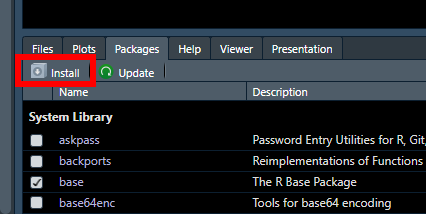
Click Install in the Packages pane:
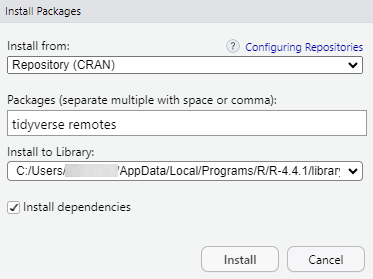
Then, type tidyverse and remotes, and click
Install:
Using the R Console
Alternatively, you can type the following into the R console:
install.packages(c("tidyverse", "remotes"))Install microCTr
Since microCTr is a package under development and not on CRAN, it must be installed differently. Type the following into the R console:
remotes::install_github("ricompute/microCTr")